
Job costs and profit in one place
Finally, a roofing spreadsheet that actually makes sense. I can see the job costs and profit without digging through multiple files.
Mike R.
Tampa, FL
Sep 28, 2026
 1/7
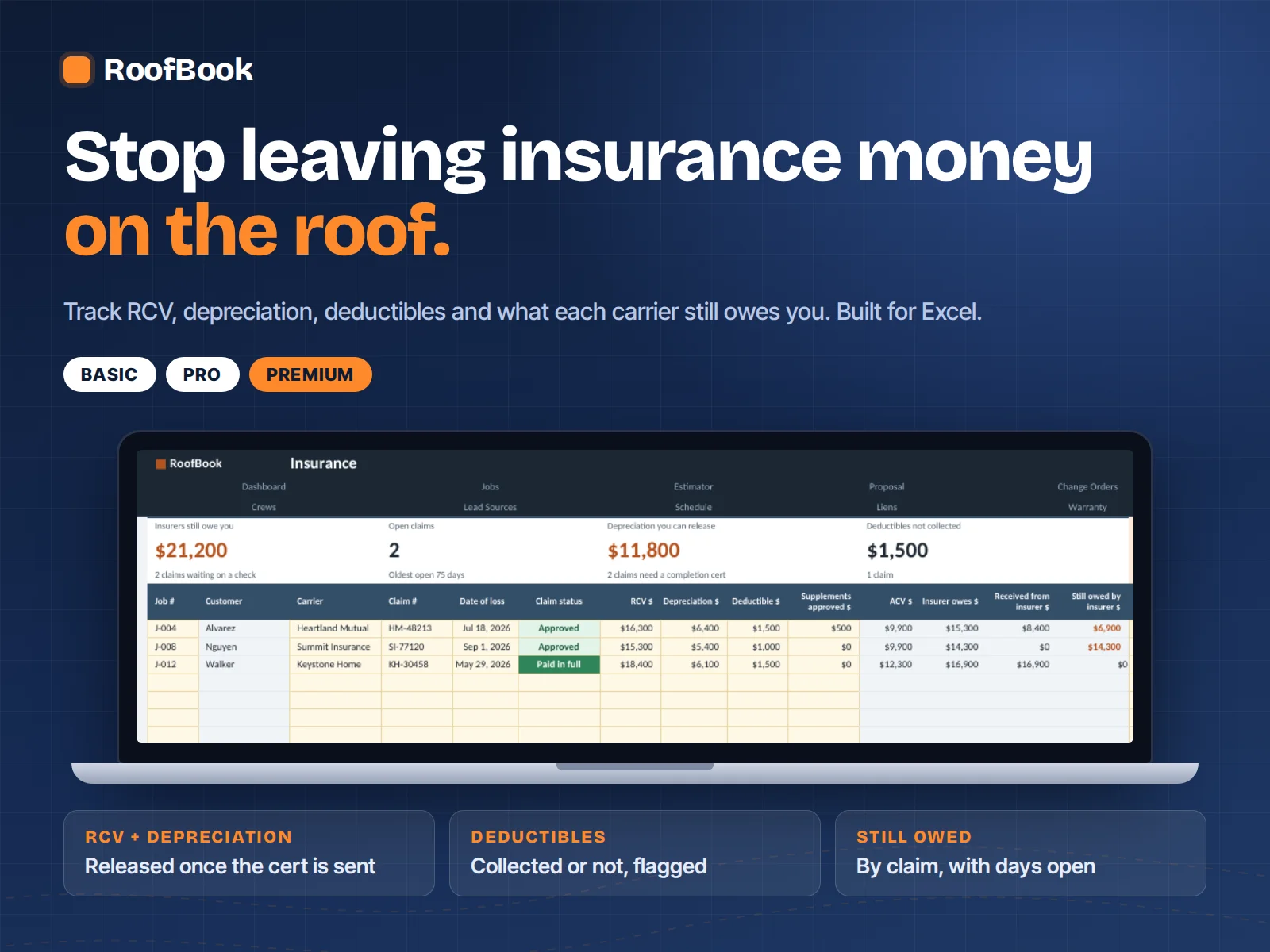
1/7The carrier approved the claim and the crew tore off Tuesday. RoofBook flags the deductible you haven't collected and the depreciation you can't release until the completion cert goes out.
Included in: Pro and PremiumBuilt for storm & insurance roofers
Built for storm & insurance roofers
Claims + Supplements + Crews + Job Profit, in one Excel file
Save up to 22% on every plan
Regular prices apply after Oct 31 at 11:59 PM ET.
---CHOOSE YOUR PLAN---
Included with every plan




Secure checkout by Whop. US dollars, one-time, no subscription.
30-day money-back guarantee
Run a real job through it. Not clearer on pricing, collections and profit? Email us within 30 days for a refund. See the Refund Policy.
Connected tabs that feed each other. Basic: Start Here, Dashboard, Jobs, Estimator, Proposal, Cash Log and Your Numbers. Pro adds Insurance, Crews and Lead Sources. Premium adds Change Orders, Schedule, Liens and Warranty, plus Good / Better / Best pricing. Cream cells are where you type. Grey cells calculate and are locked.
Add the lead on Jobs. Measure the roof on the Estimator and get a price at your target margin. Print the proposal. When the job runs, log costs and payments on Cash Log. The Dashboard and the margin on every job update themselves, so you never touch a formula. Ten minutes a day is enough.
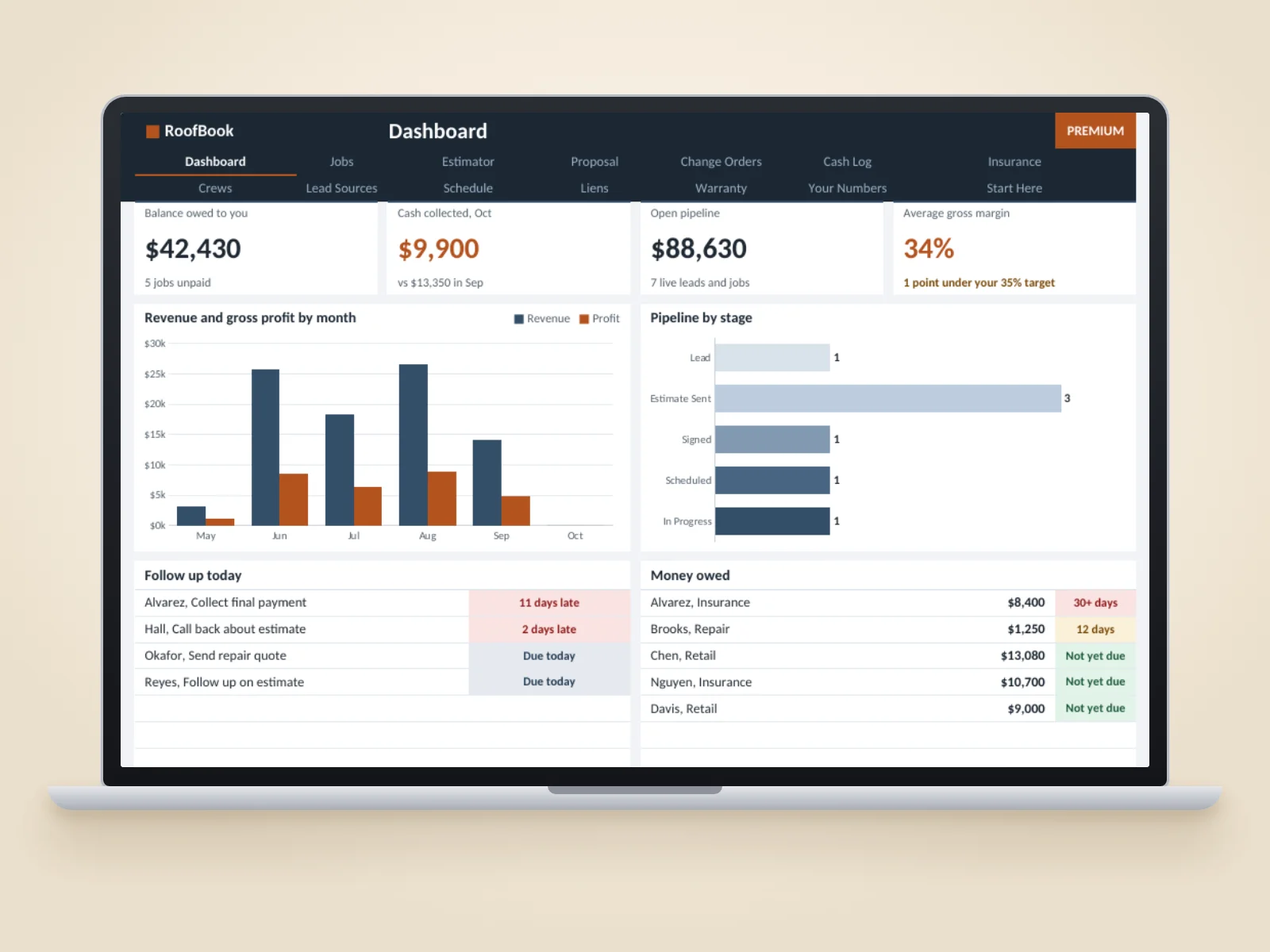
Balance owed to you, cash collected this month, open pipeline, and your average gross margin against your target. Plus a follow-up list for today, a money-owed list that shows how old each balance is, and revenue and profit by month.
You enter the roof sections, pitch, linear feet and your costs. RoofBook applies the pitch factor, waste and your tear-off and install rates, then prices the job to the gross margin you chose. It shows margin and markup side by side, so you can see exactly what a discount costs you.
Made for Microsoft Excel 2016 or newer and Microsoft 365. No macros, no add-ins. Google Sheets can open .xlsx files, but RoofBook is designed and tested for Excel, so some formatting and charts may not display as intended in Sheets.
After the storm, the paperwork
Storm season fills the calendar fast. Fifteen inspections, nine approved claims, three supplements waiting on an adjuster, and a crew that's already tearing off. Somewhere in there, a ridge vent supplement never gets sent, a depreciation holdback never gets collected, and a deductible balance gets forgotten.
RoofBook gives each claim a row and each job a margin. Log the carrier, the ACV and RCV, the supplements you sent and what got approved, and see in one place what's been paid, what's held back and what's still owed. Then compare it to what the job actually cost.
No new CRM to learn. No monthly bill. Just a clear record you can open before the next call with the adjuster.

What you get
Real screens from the workbook, with sample jobs. Enter your numbers once and they flow into your proposals, claims and dashboard.
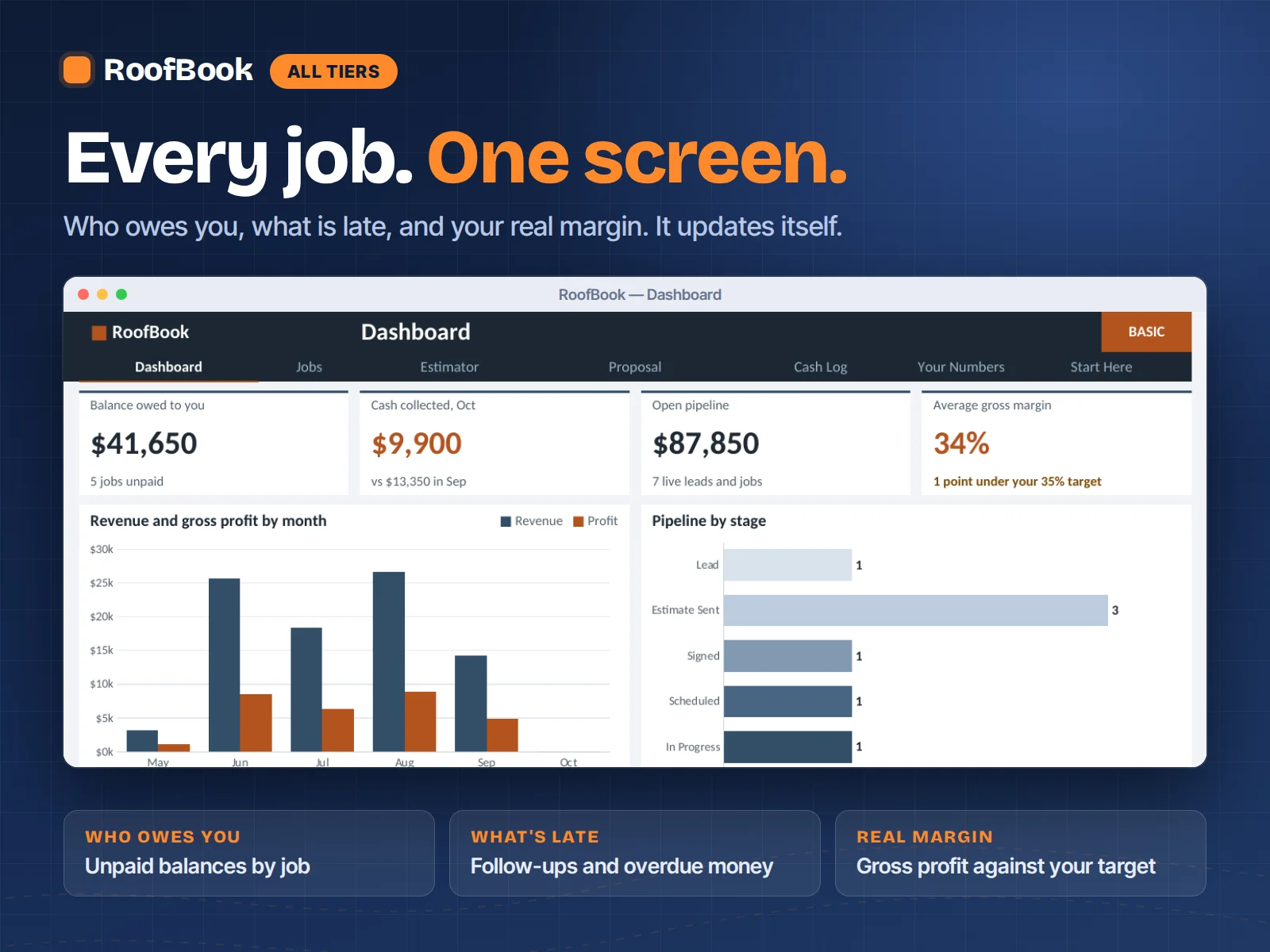
Dashboard
All plansBalance owed, cash collected, open pipeline and your average gross margin. Plus today's follow-ups and every unpaid balance, oldest first.
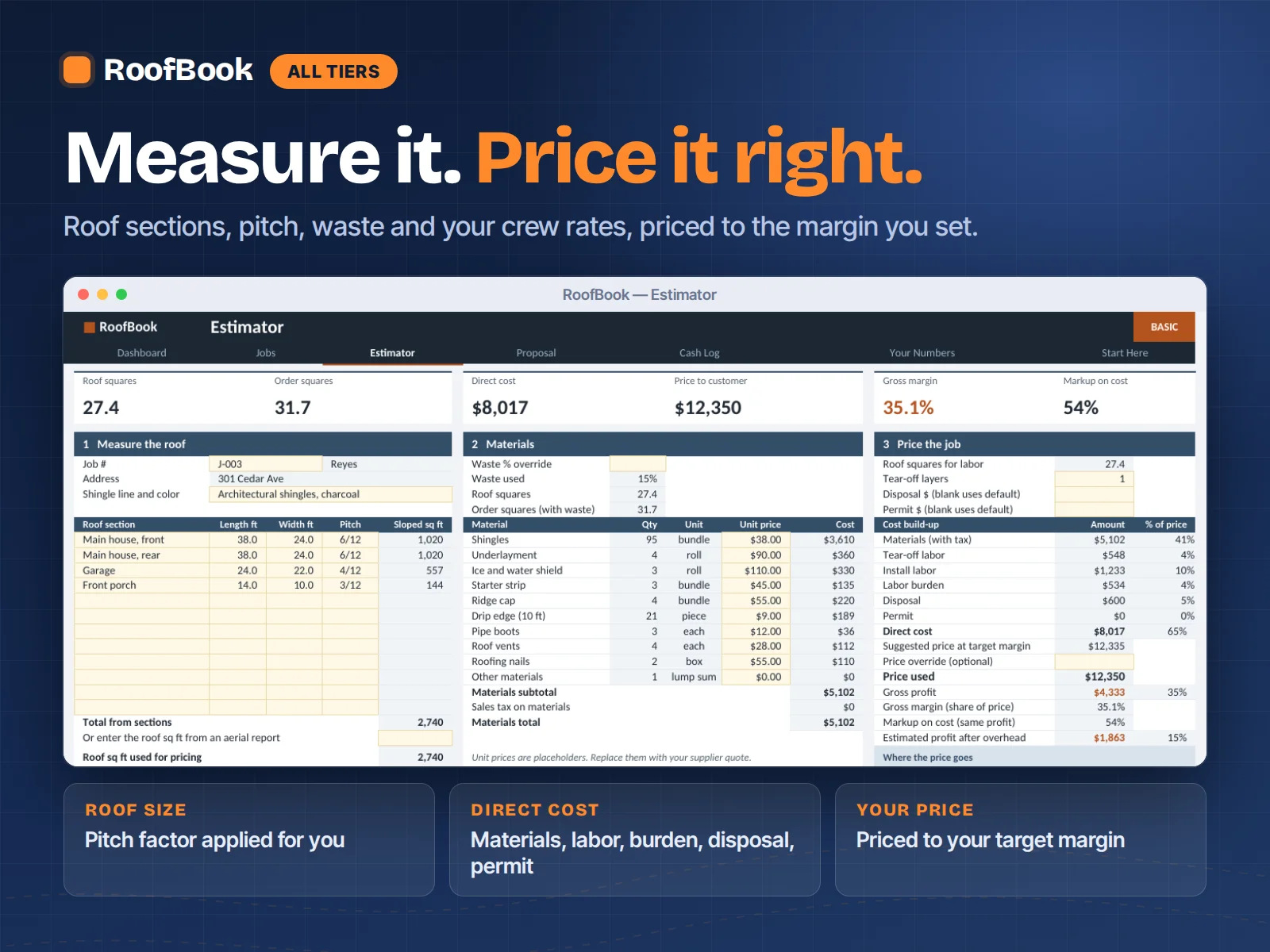
Estimator
All plansRoof sections, pitch, waste, tear-off layers and your crew rates in. Direct cost and the price that hits your target margin out.
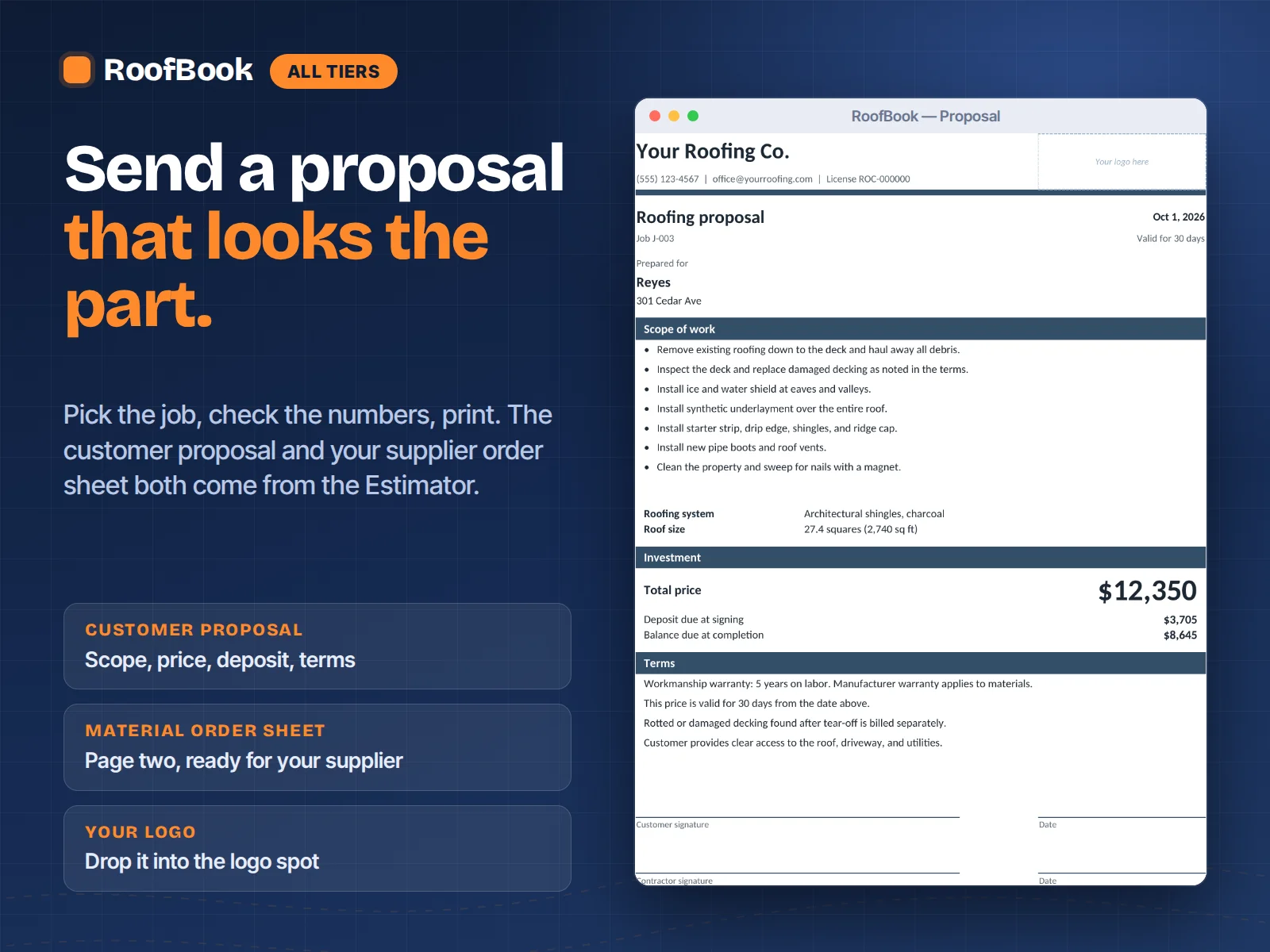
Proposal
All plansPick a job and a branded customer proposal fills itself in. Your supplier's material order sheet is on page two.
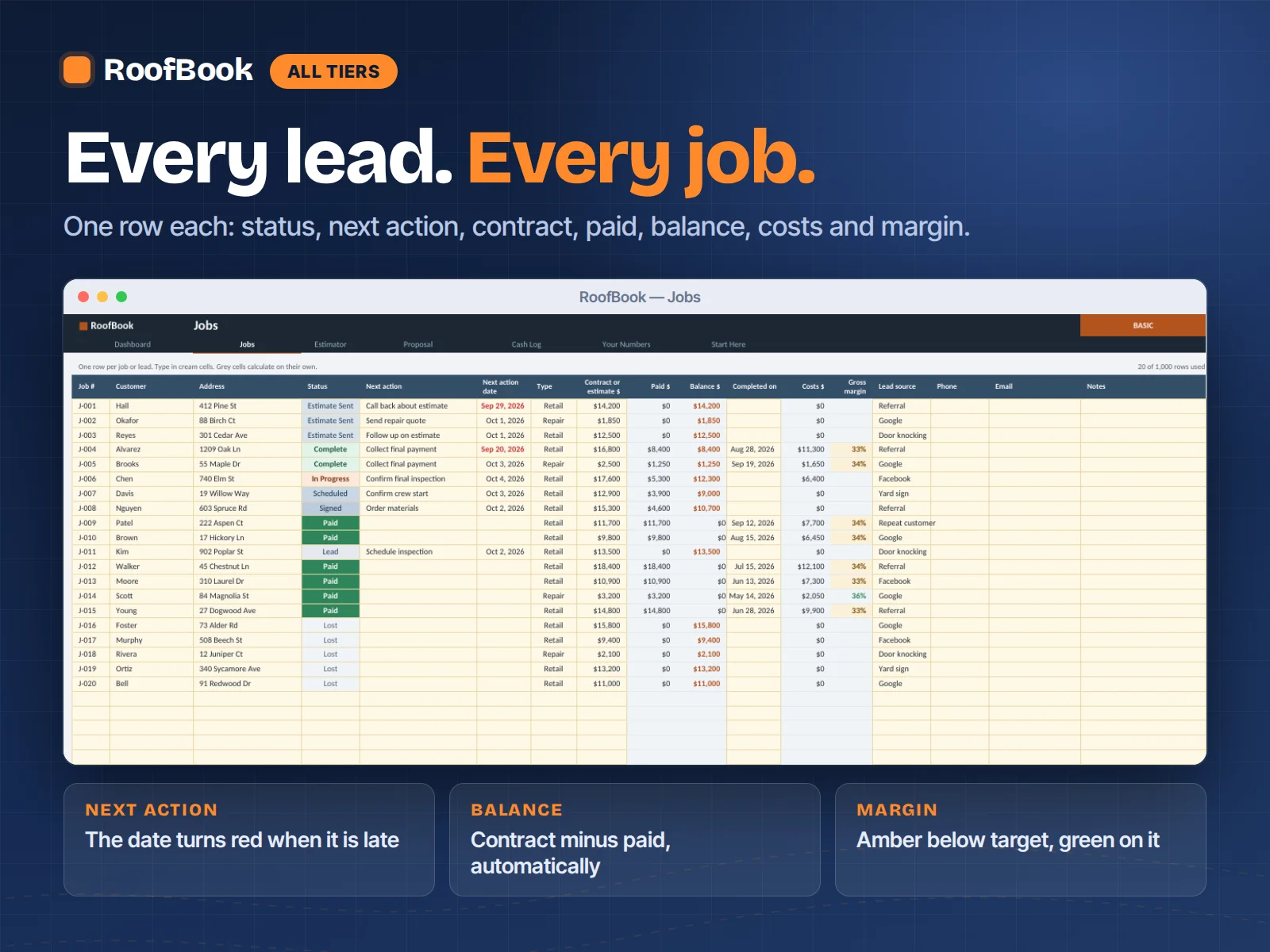
Jobs
All plansOne row per lead and job: status, next action, contract, paid, balance, costs and margin. Late follow-ups turn red.
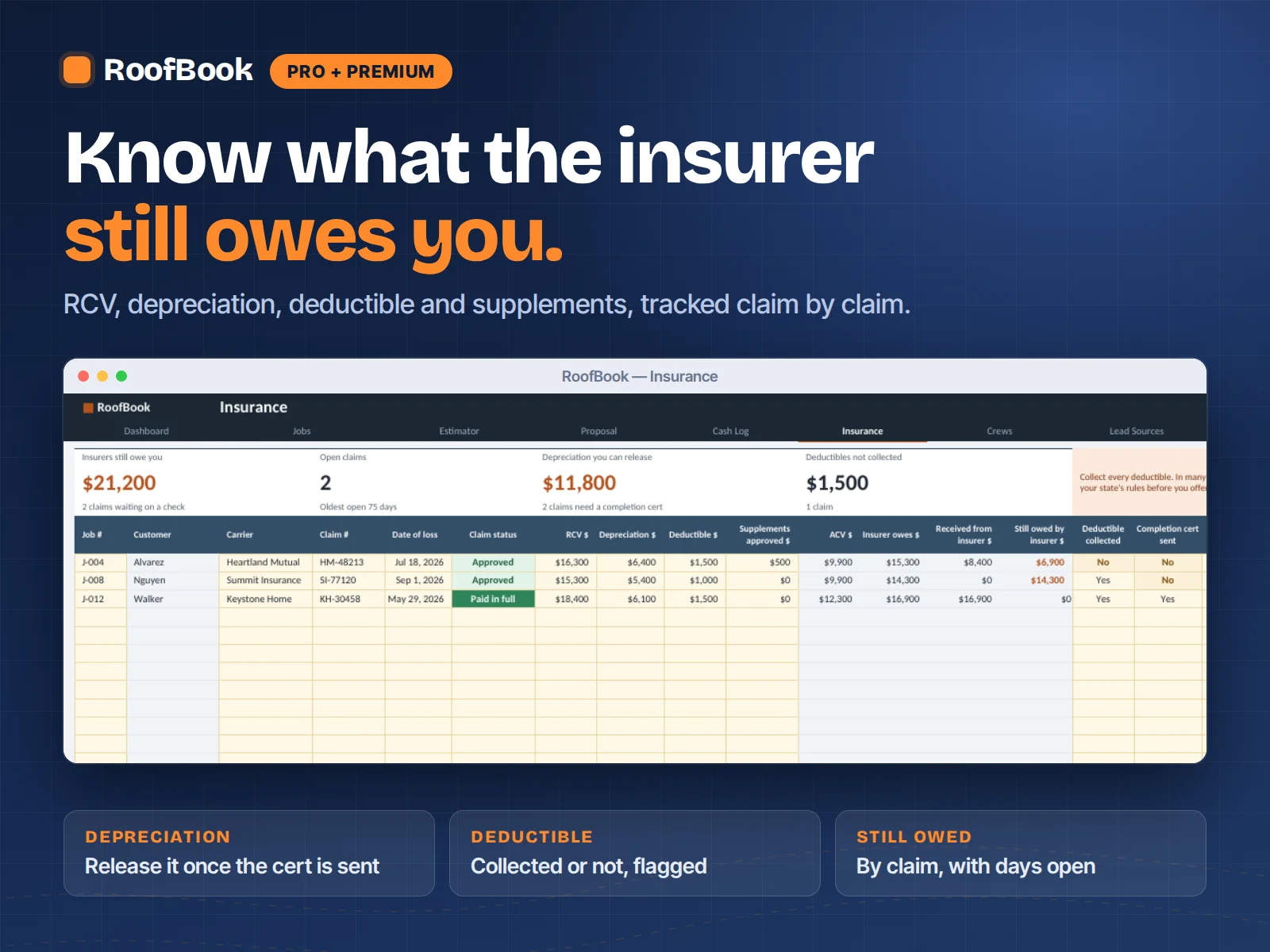
Insurance
Pro + PremiumRCV, ACV, depreciation, deductible and supplements, claim by claim. See what each carrier still owes you and how long it's been open.
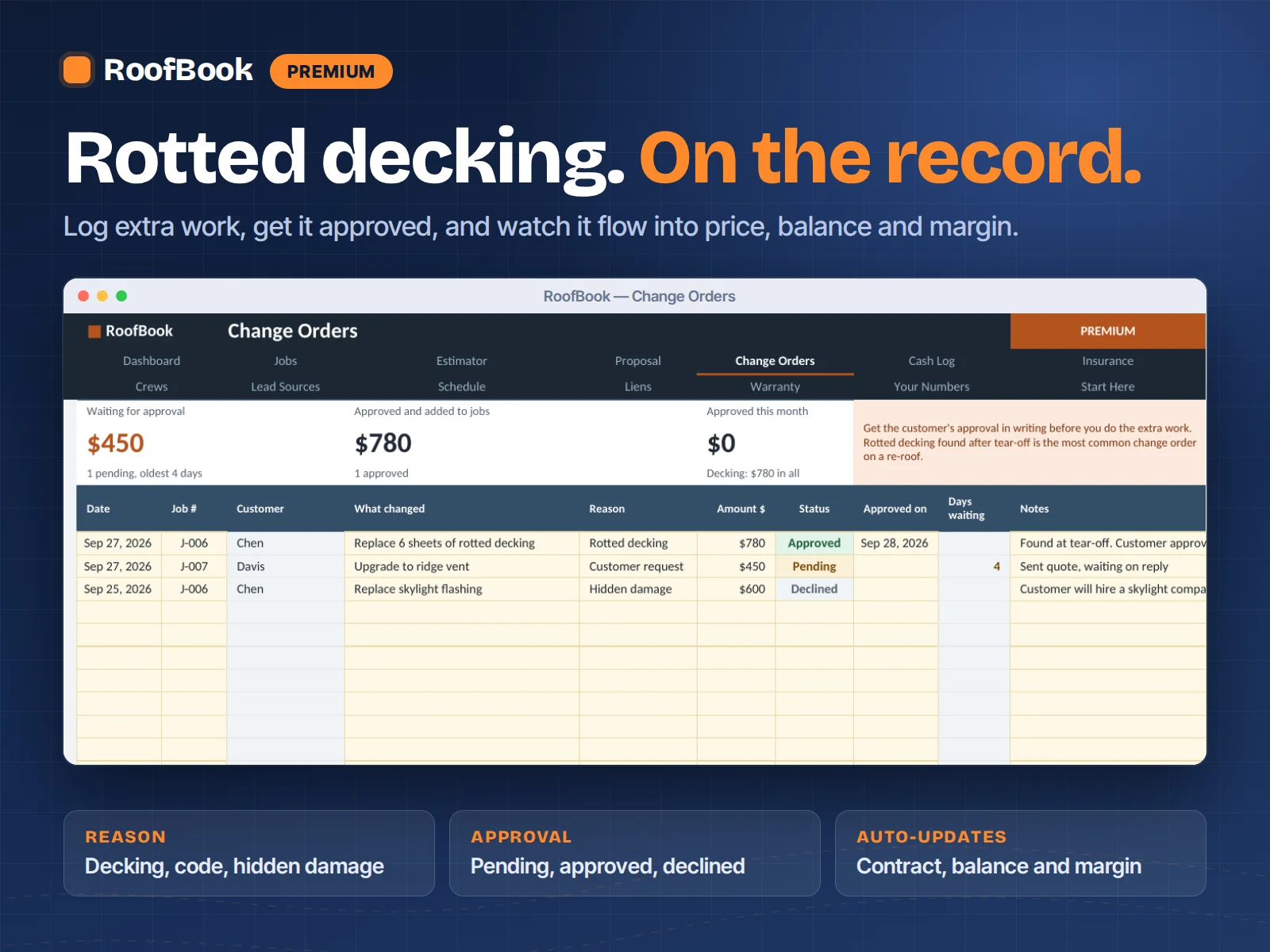
Change Orders
PremiumRotted decking, code upgrades, hidden damage. Log it, get it approved, and it flows into price, balance and margin.
Markup is not margin
That gap is where a lot of roofing profit disappears, before overhead, callbacks or a supplement the carrier won't pay. RoofBook prices to the margin you choose, so you don't have to do this math in the truck.
| You mark up | You actually keep |
|---|---|
| 20% | 16.7% |
| 30% | 23.1% |
| 40% | 28.6% |
| 50% | 33.3% |
Margin = markup ÷ (1 + markup). Illustrative math, not a guarantee of results.
A clear fit matters
It's intentionally focused. Here's what it's built to do, and what it's not.
Built for you if…
Choose something else if…
If the core version is what you need, start with Basic at $199 and use the 30-day refund window to test it on your real jobs.
From RoofBook customers
Finally, a roofing spreadsheet that actually makes sense. I can see the job costs and profit without digging through multiple files.
Mike R.
Tampa, FL
Sep 28, 2026
Been using spreadsheets for years, but this is much more organized. Makes estimating and tracking each job a lot easier.
Jason W.
Dallas, TX
Sep 23, 2026
The job costing section alone is worth it. I can see where we're spending too much before the job gets out of hand.
Chris M.
Phoenix, AZ
Sep 18, 2026
Simple enough to use every day but detailed enough for a growing roofing business. Exactly what I was looking for.
Brian T.
Charlotte, NC
Sep 16, 2026
I wanted something specifically for roofing instead of trying to modify a generic contractor spreadsheet. This saved me a lot of setup time.
Anthony P.
Orlando, FL
Sep 11, 2026
Really helpful for keeping materials, labor, payments and job profitability together. Much cleaner than the system I had before.
Daniel S.
Houston, TX
Sep 6, 2026
"Finally, a roofing spreadsheet that actually makes sense. I can see the job costs and profit without digging through multiple files."
Mike R.
Tampa, FL
A practical starting point
Day 1
Open the file, add your active jobs and enter each claim's carrier, ACV and RCV. Price your next retail roof on the Estimator.
Week 1
Log supplements as you send them and payments as they land. Overdue follow-ups and balances due start to show themselves.
Month 1
Open the Dashboard and see revenue, costs and margin across every active job in one screen.
Next storm
You price from what past roofs actually cost, not gut feel, and you already know which supplements you tend to leave on the table.
The simple promise
Compare plans
Every plan is a one-time payment. If you outgrow your tier, existing customers can upgrade for less than the price difference.
| What's included | Basic For solo roofers $199 $249 | Pro For small crews Most Popular$399 $499 | Premium For growing companies Best Value$699 $899 |
|---|---|---|---|
| Jobs, Cash Log and Dashboard | |||
| Estimator: price every roof to your target margin | |||
| Branded proposal + supplier material order sheet | |||
| Break-even and “Can I match this bid?” | |||
| Insurance claims: RCV, ACV, depreciation, deductible | — | ||
| Crew and sub pay, with labor cost on every job | — | ||
| Lead Sources: which marketing pays | — | ||
| Change Orders that update price and margin | — | — | |
| 14-day crew Schedule + double-booking alerts | — | — | |
| Lien and notice deadline tracker | — | — | |
| Warranty callback log | — | — | |
| Good / Better / Best pricing | — | — | |
| User manual (PDF) for your tier | |||
| Roof Inspection Checklist + Insurance Claim Playbook (free) | — | ||
| Job Closeout Kit + Pricing & Margin Cheat Sheet (free) | — | — |
Optional add-ons at checkout: Future Updates + Priority Support ($19), Canvassing & Storm Lead Tracker ($39), Sales Commission Tracker ($49).
Before the next storm hits
Set up your claims tracker tonight so that when the phones light up, every job already has a home. One payment, and the file is yours to keep.
Still deciding?
It's built for exactly that size: owner-operators and small crews running roughly 1 to 25 jobs a month, retail and insurance work, residential and light commercial. If your pricing lives in your head, a notebook or an old estimate you keep copying, this is the gap it closes.
No. If you can type in a cell, you can run it. Yellow cells are where you type. Gray cells calculate on their own and are locked, so a stray tap can't break a formula. The Cover and README tabs tell you where to start, and the manual walks you through your first job.
Basic is for a small team or a solo owner: Job Tracker, Expenses, Payments and the Dashboard. Pro adds the Estimator, one-click Proposals, Materials and Labor logs and Budget vs Actual. Premium adds Project Overview, Billing schedule, Change Orders, daily Cash Flow, Supplier and Crew tracking for owners running several jobs at once. Prices are shown above. Every plan is a one-time payment. No monthly fee, no login.
You price the roof once on the Estimator: squares, tear-off, underlayment, shingles, flashing, labor, dumpster, permit and your target margin. On Proposals you pick the job from a dropdown and the customer-facing proposal fills itself in: scope, price, terms and signature lines. Print it or save it as a PDF.
RoofBook is built and tested in Microsoft Excel (2016 or newer, Microsoft 365 and Excel for Mac). It's a standard .xlsx with no macros or add-ins. It also opens in Google Sheets and Numbers, but some formatting and sheet protection can behave differently there, so we recommend Excel for the best experience.
No, and it's not trying to. It's the profit-and-paperwork layer: what a roof should cost, what you quoted, what it actually cost and who still owes you. Plenty of contractors run it next to a CRM, or instead of one while they're small.
No. RoofBook tracks your claims, supplements, ACV vs RCV and payments. It doesn't adjust claims or give legal or insurance advice. Rules on deductibles, lien rights and licensing differ by state, so check yours (many states restrict deductible waivers and rebates). Nothing in the file is a substitute for your attorney, insurer or state licensing board.
If you add Future Updates + Priority Support, you get every future version of your RoofBook plan (fixes, new formulas and new tabs for your tier) emailed to you at no extra cost for as long as we offer that plan, plus front-of-the-line email support. It doesn't include custom work or new products. If we ever stop offering your plan or close the site, we can end Future Updates and Priority Support with notice by email, and you keep the files you already downloaded. See our Terms of Service for details.
Yes. Payment is handled by Whop, a third-party payment platform, right on our checkout page. Your card details go straight to them and never touch our servers. Everything is priced and charged in US dollars.
You pay on our one-page checkout. Once payment is confirmed, your download links appear on the confirmation page and are emailed to you, usually within a few minutes. Check spam if you don't see it, or email us.
Use it on a real job. If it doesn't make your pricing, billing and profit clearer than what you use now, email us within 30 days of purchase for a refund under the Refund Policy.
One-time purchase · 30-day money-back guarantee
RoofBook Pro
30-day guarantee · Instant download · No subscription